Satelon Tracking System
Satelon Main Screen View – A Powerful Tool for Vehicle Monitoring
In software, an interface overflowing with buttons and features isn’t always the best thing. In Satelon, we focus on usability and usefulness. These are the principles that our vehicle monitoring platform is built on.
Everything You Always Wanted to Know About Your Company Vehicles. On One Screen
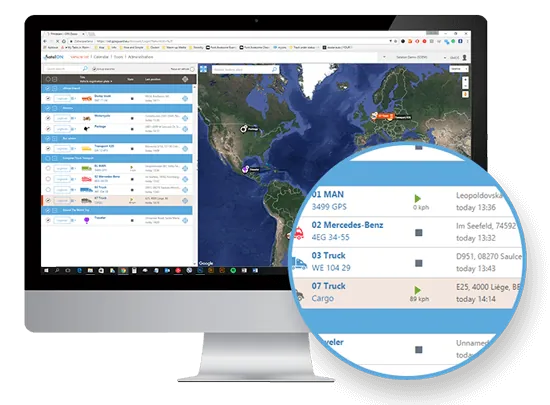
The main screen in the Satelon on line platform – a.k.a the vehicle list - is a place where you land after logging in.
The vehicle list screen is divided into two parts: the list of your vehicles (obviously) and the map.
Neither the list or the map is too detailed in the initial view, but they both serve the purpose of a quick overview. You are instantly aware of the present situation. You can see where all your vehicles are and whether they are in operation.
Need more details on the vehicles? Or do you find the map too small? You don’t need to leave the main screen.
Just drag the line that divides the list from the map. Enlarge the list to see more information on the vehicles or their whereabouts.
The division line between the vehicle list and the map is elastic enough for you to find the sweet spot.
Interactive, Light, Fast and Easy To Use
The Vehicle list is not only about dragging the division between the map and the vehicle listing.
The two parts of the screen are closely connected and interact with each other.
Just click on the “localize” icon by the selected vehicle. The map’s focus shifts to the very car you are looking for. You will see not only its current position, but also the recent route highlighted in the map.
And it works the other way round, naturally. By clicking on a vehicle in the map, you are presented with corresponding info (e.g. current speed) and more details unroll on the vehicle listing.
Read more about our unique system.
Advanced features just one click away
There are moments, where the main screen is not enough. Some users need to see different map types. Or they need to work with single vehicle details in the log book.
This is no problem with Satelon tracking platform. It provides full and innovative features such as the mentioned logbook or a brand new calendar view.
Read about our next exclusive features: Calendar view and Log book with an intelligent map view
Stay in touch with us
Fill in this form and we'll get back to you.